Showing posts with label framework designing. Show all posts

Thursday, 26 October 2023

Using one XPath for multiple login page

I had a scenario in multi tenant azure environment, where the login page were different for DEV, UAT, STG environment. Instead of creating separate login page for each environment, I had to optimise by having one login handler.

People can have different approach to handle Login Page.

I implemented a solution where irrespective of login page, we should have a single XPath for Username, Password and Signin button.

The solution is very simple to implement of having multiple "or" conditions in the XPath of username field, password field and signing button.

Ultimately, the appearance of the Username field is important. 

Let's take an example of different login page of outlook.com and yahoo.com username field, I used below XPath

//input[@id='login-username' or @id='i0116']

Please refer below screenshot.


-Pankaj Dhapola
Let's Think on it

Saturday, 15 September 2012

Library Files

This is a continuation

In an automation framework architecture library files plays an important role. Normally people try to built most generalized function and place them at separate and common place.

I see that people always ask me questions which one is good to use Action or functions? I have personal view on these to use Functions instead of Actions. Of-course every aspects have its own pros and cons. Some people may feel comfortable to use Actions rather than Functions.

Whenever I create a functions I always have an intentions in my mind whether I can make this functions more generalized? I have developed an habit to have function's maximum usability. But be caution think to make generalized function should not change your motto of creating it ;)


A function doesn't meant to only have the VBscript codes, of-course you can always have QTP script codes . Functions are often treated as keywords in QTP, now a keyword can be placed separately in excel file, text file, or XML file. so that you can design keyword driven framework.

While automating (developing script) a particular workflow/E2E test case, first I create scripts in Linear manner in a particular action. Later on I break down these workflow in smaller script parts, of-course to divide these you need to know other test cases also so that you can easily identify commonality in functionality. Don't worry if you are not able to identify commonality, just go ahead and as you move ahead with framework designing you will be able to know it.

Now, the divided code is bundled under functions with a name which could make sense, for example NavigateTo(strURL), Login(strUserName, strPassword), NavigateToPageMenu(strMenuName), LogOut()

In an attempt to make execution faster and in terms of maintenance we load the functions runtime by leveraging power of "ExecuteFile" method. See, when you associate the ".qfl" file with script, so when you want to move complete framework folder, you will have to re-associate the library files. Of-course while script development you would require to associate library file for debugging purpose. Later on after your code is fully developed you can use "ExecuteFile" method to make all functions available in QTP run session during runtime.

I will update some more ideas in future, ofcourse many more ideas related to Library files.

Now Talking about our Framework development, presuming I have functional knowledge of AUT. I decide to place functions in appropriate library file. When I say appropriate library file . . . I meant only those library files containing specific functions which are relevant to a particular module or Test Case should be loaded. It doesn't make sense if you have numerous function written in a library file and in runtime load, these function are available which are of no use.

I have seen people writing function in an unorganized fashion and a single library files are flooded with many functions which are sometimes create problem during maintenance. Ofcourse no harm with that, but I believe this as to be the best practices.

See below image for a gist I am trying to convey . . .


 In above framework folder structure you can see some library files example placed. I guess no need to explain library files other than "GlobalFunctions.qfl"

GlobalFunctions.qfl :- This is one its kind, you know as the name suggest I place all those functions which 
  • are repetitively used
  • needs to have global scope
  • are very generalized
For example functions like
FrameworkInitializer, LoadModuleBasedTestData, LoadGlobalDataVariablesFromGlobalDataxls, CreateOutputDataFile, InitializeLogs, WriteCurrentLogInLogFile, ReportPassFail . . .

I have purposefully named these functions to be more meaningful to you ;)

GlobalFunctions.qfl file is associated with all QTP TestScript. The decision to put functions in which library files solely depends on you, you have to design the architecture, you have to design the workflow of you framework, you have to decide when to load which library files.

-Pankaj Dhapola 
Think on it

Friday, 15 June 2012

Entry point in your Automation Framework

*getGlobalDataxlsPath()shall return the complete path of "GlobalData.xls" file

This is a small part to understand  getGlobalDataxlsPath()


Now the logic behind having an entry point for your Automation framework is whenever you execute any script, your framework structure should be available in Execution QTP environment. Since "GlobalData.xls" itself contain the structure, how you gonna access this excel sheet seamlessly.

One Idea, let's leverage QTP's Enviroment("TestDir") variable.

So your function called getGlobalDataxlsPath() Should return a path like for example 
"C:\\whereveryouhaveplaced\GlobalData.xls"
Colored path is what we need to extract.

Look at below code

Function  getGlobalDataxlsPath()
                 getGlobalDataxlsPath = Mid(Environment("TestDir"), 1, instr(1,Environment("TestDir"), "Framework")+10)
End Function

I hope you got dat!!!

Notice the dependency, your Framework Base folder should contain the word "Framework".

-Pankaj Dhapola
Let's Think on it

Tuesday, 24 April 2012

Bring your Test Data in QTP environment

This is continuation . . .

Okay,
Hear it goes

Well my Aim is to Bring an excel stored data into QTP Environment.

I hope you remember this figure . . .


Well this is the Screenshot of "GlobalData.xls", I have explained why did I named this excel as GlobalData.xls

Let's give this excel file an importance because whenever you script is going to start with execution, this file will play major role in term of Initializing your per-requisite of your Test.

Notice the column names "Key" and "Value", what I gonna tell you now, I think I gotcha!!!

I shall extract this data from excel using ADODB, then store that data into Dictionary Object and then make that Dictionary object as Environment Variable.


Set objConnection = CreateObject("ADODB.Connection")
Set objRecordSet = CreateObject("ADODB.Recordset")
objConnection.Open "Provider=Microsoft.Jet.OLEDB.4.0;Data Source= & getGlobalDataxlsPath() & ";Extended Properties=""Excel 8.0;HDR=Yes;"";"
objRecordset.Open "Select * FROM [SheetName$]", objConnection


Now Since you've got the RecordSet, now it's time for Dictionary Object to come into picture

Set objDict = CreateObject("Scripting.Dictionary")
Do Until objRecordset.EOF
   objDict.Add objRecordset.Fields.Item("Key"),  objRecordset.Fields.Item("Value")
   objRecordset.MoveNext
Loop

Now let's make this Dictionary Object an Environment Variable.

Environment.Value("GlobalData") = objDict


From now on where ever you want you can use the Dictionary object stored in Environment, your reference code will be

strBasePath = Environment("GlobalData")("BasePath")

For more insight on referencing on Environment Variables click here

So folks,
I have shown you the code just for understanding the concept behind it, for codes google it out!!!


*getGlobalDataxlsPath()shall return the complete path of "GlobalData.xls" file, Since we need to achieve portability, the path shouldn't be the static one, I shall post later on the logic behind it.

Till Then Take Care . . .

-Pankaj Dhapola
Let's Think on it

Monday, 23 April 2012

Automation Framework Architecture using QTP

Automation Framework Architecture using QTP

Every one knows about the different types of framework
I'm not going to explain you about these framework (Many Authors have done that), I would like to visualize you how you can start off with designing of your framework . . .
I'll try my best to share with clarity and understanding


Well first off all, you should make a mind map (or simply draw a DFD) of the structure of your framework, for example
1) The flow of input data from a storage into your application
2) How you will arrange the output of the application and display/store results?
3) How your execution of scripts would be arranged both locally and in QC?
4) How is your reporting and logger functionality will work?

All this questions definitely come after experience, but people with great Visualization would grasp it easily.

Now their are some aspects of any framework

1) Library files:- which is bundle of functions in .qfl, .vbs, and/or .txt files.
2) Test Data: - The required inputs in your application, which may be stored in excel(mostly), txt, CSV etc
3) Test Scripts: - A place where all Scripts are stored functional and sub functional wise.
4) Results:- A place where your application results/output will be generated. Note that this place can be different in QC and Local folder structure
5) Object Repository: - A place where Global OR is placed if any.
6) Recovery Scenario: - A place to store recovery scenario.
7) Re-Usable Actions: - A place to keep your re-usable actions, if any.

you may also have some other folder to include depending on project.

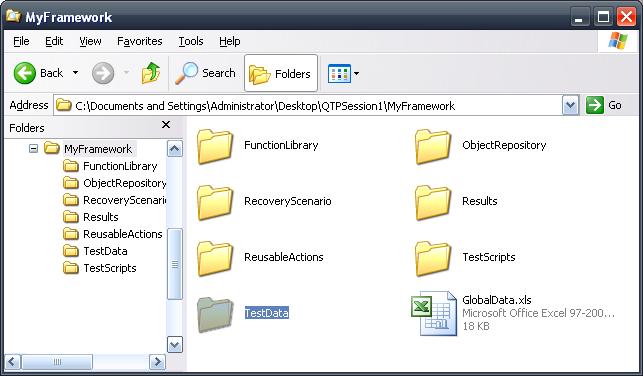
And now . . . Bundle these aspects under one roof, i.e your framework like below folder structure


Now the layout is ready, how do you let QTP know about these folder structure path, how will you keep this folder called "MyFramework" independent of a place, where-ever you put, it should run seamlessly, either in Company Shared Drive or your desktop, etc.

In short how will you make it Portable or keep integrity of relevant aspects intact.

I have a solution ("GlobalData.xls"), write down the path name of all this structure in an excel file.

See below screenshots.


The Cell formula for "BasePath" is
"=LEFT(CELL("filename",A1),FIND("[",CELL("filename",A1),1)-1)"

Now you might have question why did I Named this excel file as "GlobalData.xls"
I think I gotcha!!!

Put all your data which will be used across your script execution, the data which you would need persistent throughout your script execution like AUT URL, User-ID, Password, all function library file path, etc

See what is the advantage . . .
Put this folder wherever you want, your excel file keep the integrity of the Framework Structure path. I have seen some framework which have many configuration issues if it is migrated to another PC for execution, and time is lost while debugging.

I came up with this intact solution.

Up to me A framework should leverage Re-Usability and should be good in maintenance.

I will tell you how you will bring these data in your QTP "Environment" ;)

Taking about next thing . . . . .
LibraryFiles

What do you think about Managing Object Repository

What kind of Results/Logs do you Generate?

-Pankaj Dhapola

Tuesday, 13 December 2011

QTP Environment Variables and or Objects

How Can I make a variable/Object environmentally available i.e. throughout execution?


QTP has Environment Object which has Execution wide or global scope.

To Store your variable.

Environment.Value("MyVariable") = "MyValue"

or you can write this way

Environment("MyVariable") = "MyValue"


To Access Variable Value

strValue = Environment.Value("MyVariable")

or

strValue = Environment("MyVariable")

Do you know apart from storing simple values (like String, integer etc ), we can also store objects like dictionary, array etc.

Suppose I have defined a Dictionary Object

Set oDic = CreateObject("Scripting.Dictionary")

Following are the key-values pair defined
oDic.Add "Key1", "Value1"
oDic.Add "Key2","Value2"


Now Somewhere in code, I will store this dictionary object in Environment.

Environment("MyDictionaryObj") = oDic


How will I access it now? Here it is . . .

MyValue1 = Environment("MyDictionaryObj")("Key1")

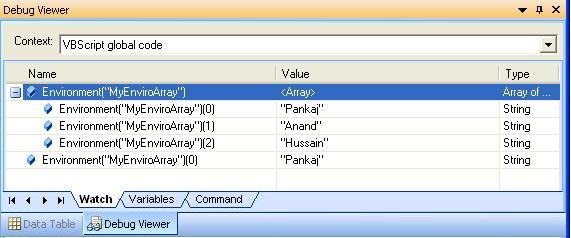
Now try to understand the above line, the Blue background will evaluate to Dictionary Object that we had stored. Now see below Debug viewer Window to make you visualize about these objects.


Similarly we can also store array
MyArray = Array("Pankaj", "Anand", "Hussain")
Environment("MyEnviroArray") = MyArray

So How will I retrieve the value, below screenshot is self explanatory.


This was all about the programmatic approach to play with Environment Object.
Now let's see what QTP has in Environment Object.

Well their are 2 types of QTP Environment object.
1. In built
2. User Defined

Under QTP IDE, go to file--> Settings

Now whatever environment variable we defined in code will be User Defined type of Environment Variables.

QTP has inbuilt defines Variables which can be leveraged in your code from Framework designing perspective like "TestDir", "TestName", "UserName" etc . . .
Below is the screenshot of debug viewer that is during run time this variables are also available

Now Talking about User Defined Variable
You can also define variable initially also. like this . . .


Now Below is the screenshot of "Test Settings" Window during Run Time.
All user defined variables can be seen in this window.
Can you see it? . . . Open your QTP- try it

And Last but not the least you can also take bunch of Environment variable in an XML file and import in QTP. Create XML file like below fig and then use import functionality which is available in File--> Settings window.


Below is the figure after importing XML based Environment Variables


So, go ahead and try it . . .
Have a great time.

-Pankaj Dhapola

Friday, 9 December 2011

QTP - Why Analysis and Planning is important before you start with framework designing.

Of course everyone knows why planning is important.

Now The question is what shall I do for framework designing. What are the points do I need to remember while designing a framework?
Well well well . . .
Framework designing is not a simple thing where you learn this blog or learn material from internet and you start off with it. It require work experience in various framework, but this is not the end.

Their is a great saying I heard from one my close friend Srimaya Mahapatra
"Wise people are those who learn from their mistakes and Wisest people are those who learn from other's mistake."
Seems to be a powerful statement enough to change one's life.

Coming back to business . . .

Before you start designing a framework in QTP, below are the question you need to ask yourself.
1) Do I know the functionality of each module for AUT?
2) Do I know what are the input data into this application and what are the outputs?
3) What would be my design flow right from initialization of script to result display?
4) What kind of framework I shall use? Mostly people use hybrid one.
5) Whether to use DataTable or ADODB or both?
5) Whether to use OR or DP or both?
6) Whether to use Reporter object for reporting or Custom based results?
7) Whether to Multiple actions or Function library?
8) What kind of recovery scenario, error handling should I need to include?
9) How about synchronization?

All this question can only be answered by YOU.

To decide all these, you must have experience enough to understand usage of all these concepts.
It is advisable to go over these once, so that you could be familiar with these concepts.
It's long journey my frnds, but don't worry each journey would be refreshing. :)

I shall Go over these with an understanding where novice people can understand and people with astonishment will ask themselves "Oooooo! QTP aisa kaam karta hai kya!!!" i.e. Do really QTP work internally like this?

Thanks and Warm Regards
Pankaj Dhapola